





ohanly
DE Sign in Try it free

Family organiser for calendar, chores, timetables, meals and shopping

Who needs to be where, when?

ohanly brings your family’s events, school timetables, tasks with points, meal plan and shopping list together in one place. On your phone, on the kitchen tablet and on the computer – no ads, and on your own server if you like.

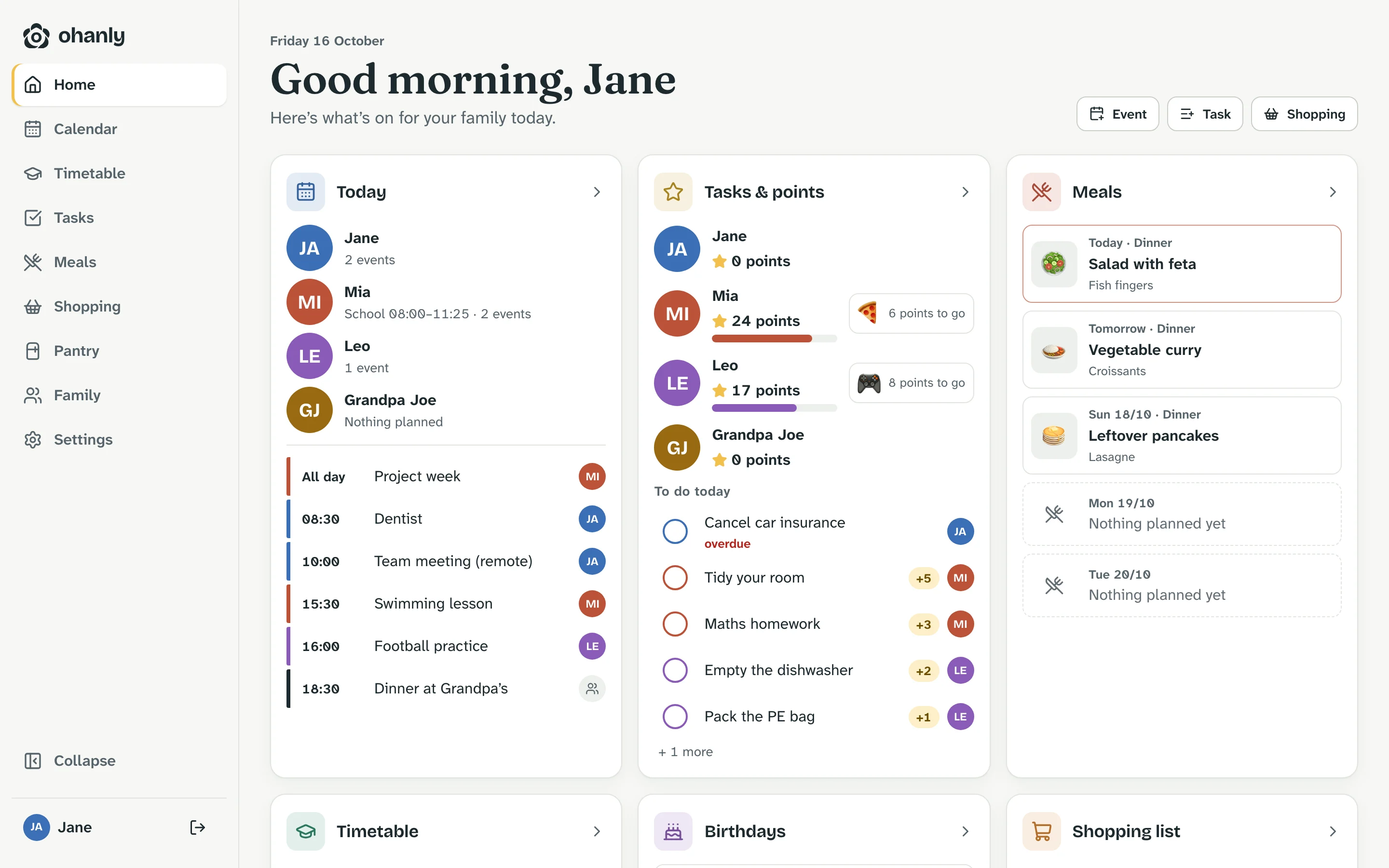
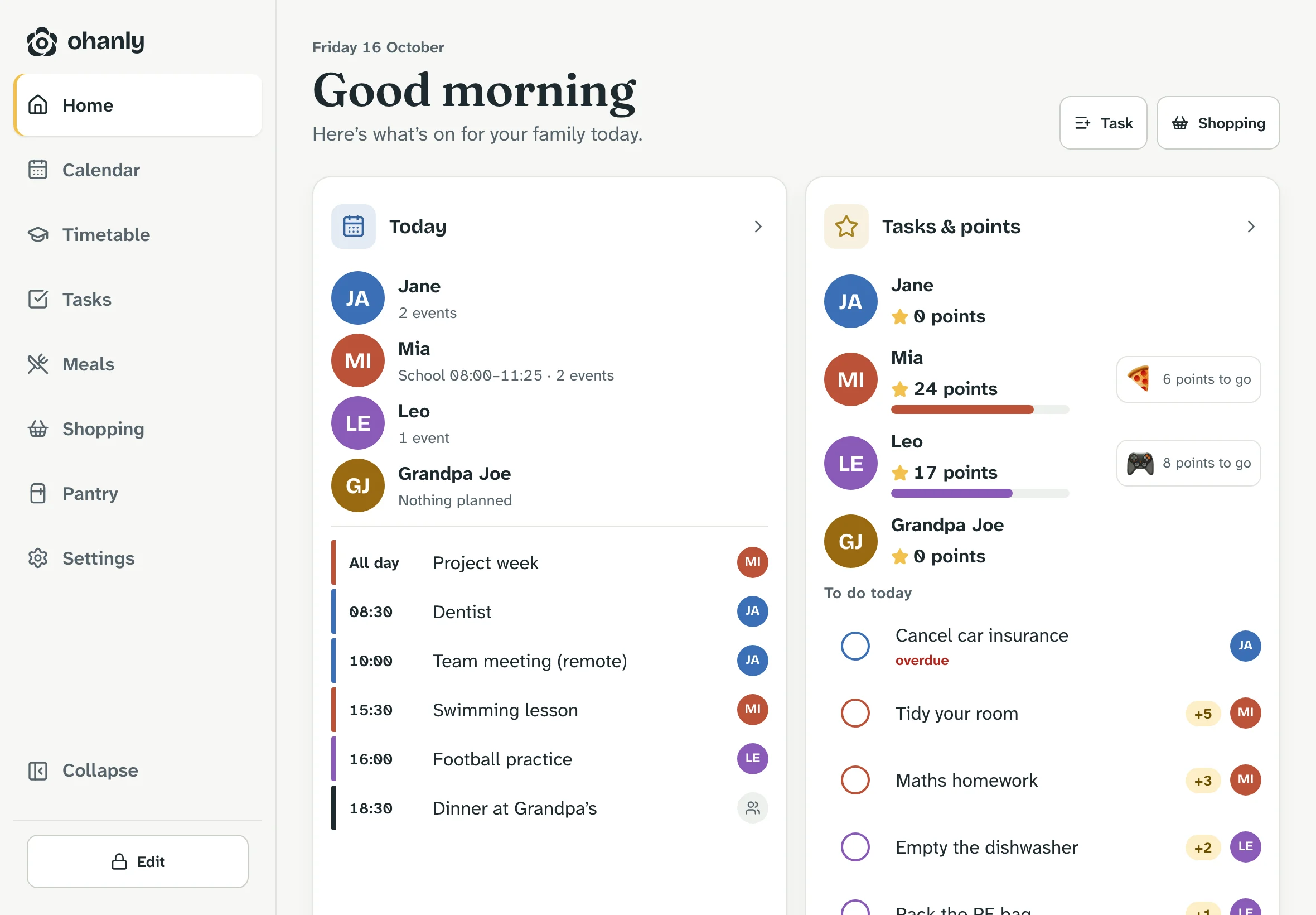
The Summers’ home screen: today’s events per person, tasks and points for Jane, Mia, Leo and Grandpa Joe, and the meal plan for the next few days

A Tuesday with the Summers

Four people. One plan.

Everyone has their own colour – in the calendar, in tasks, on the display. Scroll through the day.

JA Jane
MI Mia 24
LE Leo 17
GJ Grandpa Joe
  • Dentist
  • Team meeting
  • Pick up Leo
  • School English · Maths · PE
  • Homework
  • Swimming lesson
  • Tidy your room
  • School
  • Dishwasher
  • Football practice
  • Pack the PE bag
  • Farmers’ market
Dinner at Grandpa’s Everyone

Calendar

One calendar. Everyone in their own colour.

A shared family calendar in month, week, day or list view – and with one tap just Mia’s events, or just your own.

  • Repeating and all-day events, with location and who it’s for
  • Public holidays, school holidays and birthdays, if you want them
  • Connect Google, iCloud, Nextcloud or any iCal address – read only or both ways
  • If an event changes on both sides, ohanly shows the conflict instead of silently overwriting it
More about the family calendar
Calendar on a phone: list of events from today onwards

Tasks & points

Tasks you’ll enjoy ticking off.

Every finished task earns points. Children see their balance and save up for a reward you choose together.

  • For one person, several or everyone – once or repeating
  • If you like, adults approve before points are credited
  • Every credit is in the history, and nothing is counted twice
More about the chore chart
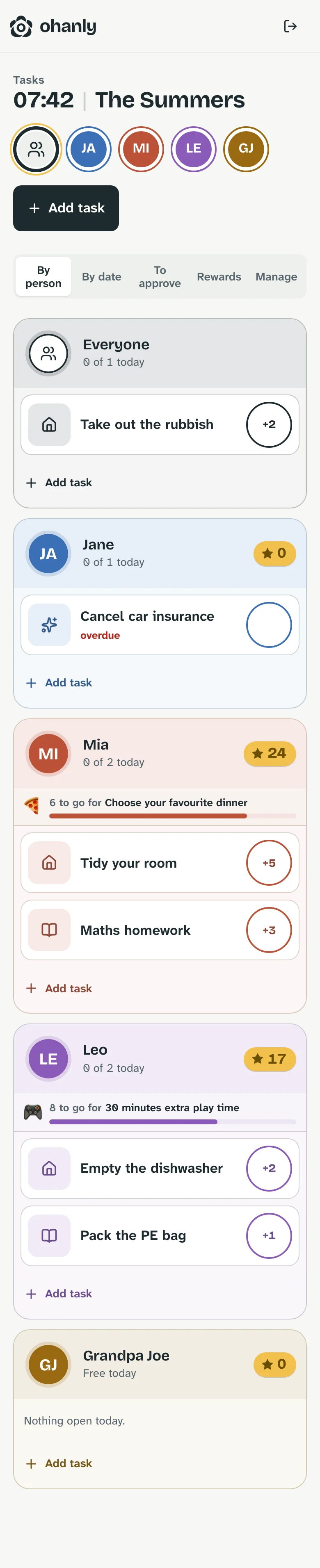
Tasks by person: Mia has 24 points and is saving for her favourite dinner, Leo has 17

Timetable

What’s on third period?

One timetable per child, with colour-coded subjects, times and rooms. ohanly opens today’s page by itself.

  • Week and day view for every child
  • Timetables with validity: new school year, new timetable
  • Only what’s needed – subject, time, room. No pupil data.
More about the timetable
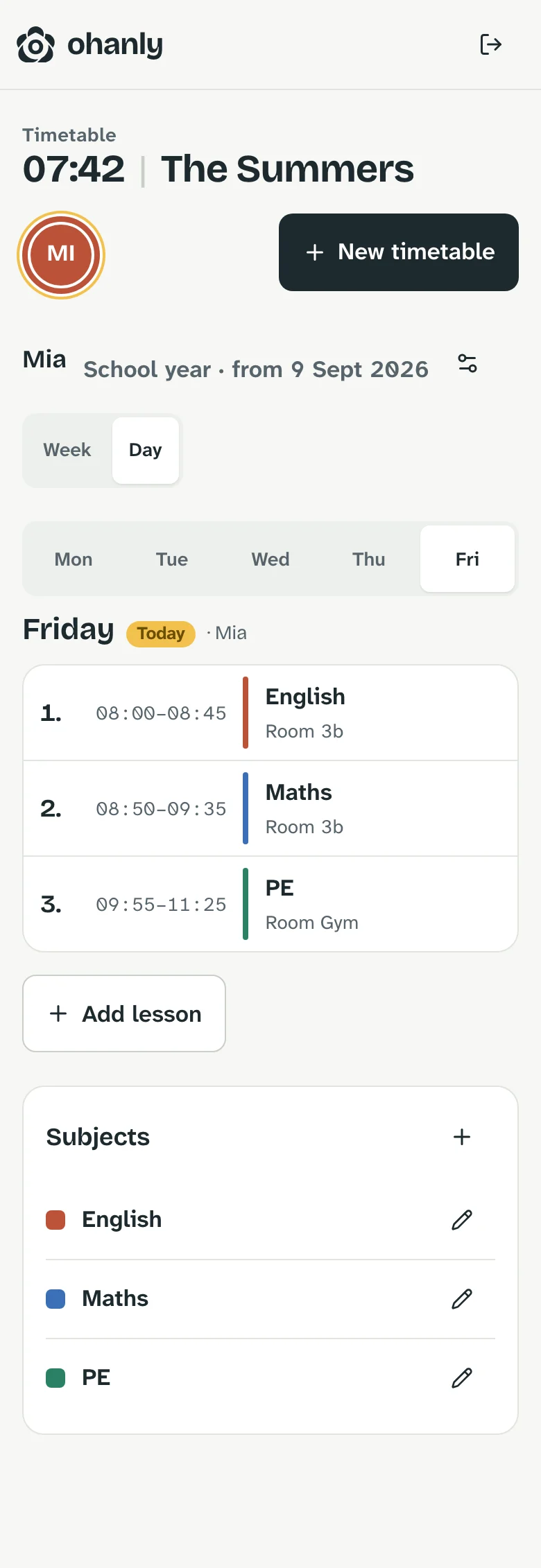
Mia’s timetable for Tuesday: English, Maths and PE with times and rooms

Meals & shopping

Meal plan in, shopping list out.

Plan breakfast, lunch and dinner for the week. “This week’s ingredients” puts everything from your recipes on the shopping list.

  • Save recipes with ingredients or import them from a link
  • Several lists, ticked off together – live on every device
  • Every item gets a matching icon automatically
More about the meal planner
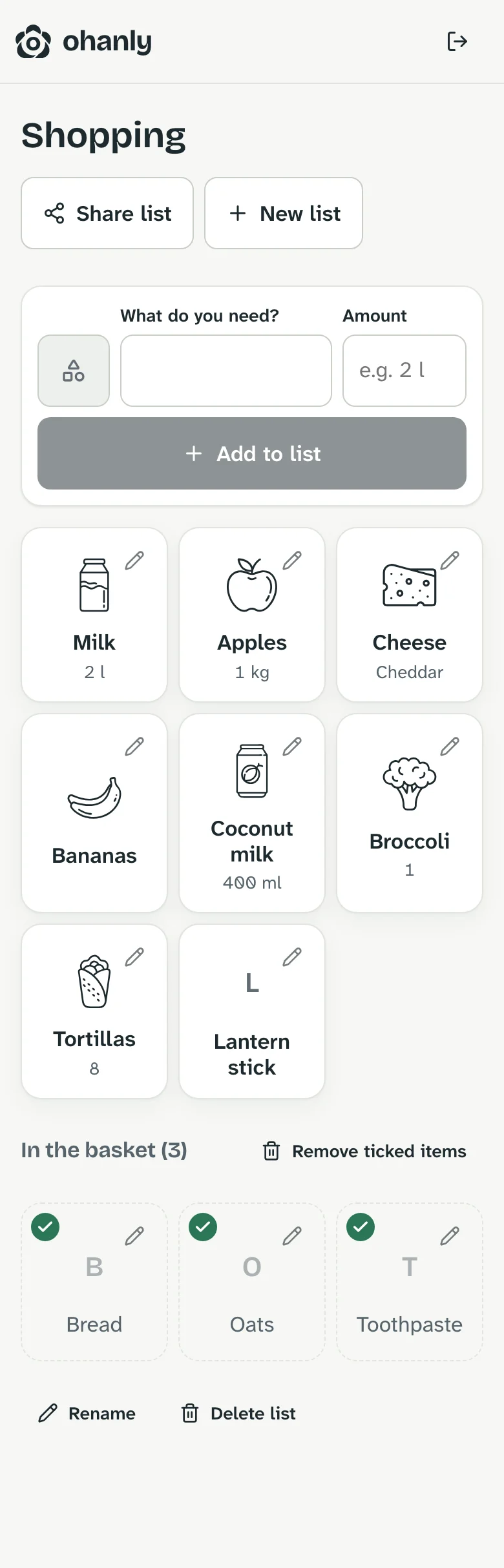
The week’s meal plan from Monday to Sunday Shopping list as tiles with icons: milk, apples, cheese, coconut milk, broccoli and tortillas; bread, oats and toothpaste already in the basket

Family display

The old tablet becomes kitchen HQ.

Pair a tablet with a code – a digital family calendar for the wall or the kitchen counter. It shows today’s overview, calendar, tasks and meal plan full screen, without anyone staying signed in. Editing only works after unlocking with your PIN.

More about the family display
Family display in landscape with today’s overview: events per person, tasks and points

In the browser. And as an app.

ohanly already runs in the browser on every device and can be installed like an app. The iPhone and iPad app is on the App Store, with a dedicated layout for the foldable iPhone Duo. The Android beta is open via the ohanly Google Group. All apps are built natively, not a wrapped website; your account and data stay the same.

Privacy

Your family is not a data set.

No ads, no tracking
ohanly is funded by subscriptions to the hosted version – not by your data.
Children without an account
Child profiles don’t need an email address. A login of their own can be linked later.
Every family on its own
Each family’s data is kept separate in the database, and every request is checked on the server.
Roles, not full access
Parents manage, children tick off. You decide who can see and change what.
Sign in with a passkey
Passkeys and two-factor sign-in are built in, not bolted on.
Take it with you, or delete it
Export all your data any time. The family can be deleted completely.

Pricing

On our servers or on yours.

ohanly Cloud

We run ohanly for you: sign up, set up your family, get going. Updates arrive by themselves. Try it free for 30 days, then monthly or yearly.

€2.99 a month or €24.99 a year (30% less) – for the whole family, VAT included.

Rather pay once? €59.99 one-time, for life – no subscription, no renewals.

Try it free for 30 days

Host it yourself

Ready-made Docker images for amd64 and arm64, PostgreSQL included. Runs on a home server, a NAS or a small VPS – free, with no subscription.

$ docker compose up -d
Setup guide

Frequently asked questions

Good to know.

What is ohanly?

ohanly is a family organiser: a shared family calendar, your children’s school timetables, chores with points, a meal plan and shopping lists in one place. Everyone has their own colour, and the whole family sees the same thing on phone, tablet and computer.

How much does ohanly cost?

You can try ohanly Cloud free for 30 days with every feature. After that the subscription costs €2.99 a month or €24.99 a year, for the whole family. The trial ends by itself; a subscription only starts if you take one out. If you host ohanly yourself, you don’t need a subscription.

If you’d rather not subscribe, pay €59.99 once and use ohanly Cloud with your whole family for as long as ohanly Cloud exists – no renewals, no further costs. Cancel a running subscription first; it keeps going until the end of the paid period.

Do children need their own account?

No. Child profiles work without an email address or password. A login of their own can be linked later – children then see their events, chores and points, but nothing from the admin side.

Can I connect Google Calendar, iCloud or Outlook?

Yes. Google calendars connect through Google sign-in, iCloud and Nextcloud through CalDAV – read only or both ways. Other calendars, such as Outlook or your school’s calendar, can be added read only via their iCal address. If an event changes on both sides, ohanly shows the conflict instead of silently overwriting it.

Does the calendar show public holidays, school holidays and birthdays?

Yes. Public holidays and school holidays for your region can appear as all-day entries. Add a birthday once and ohanly shows it in the calendar every year.

How do points for chores work?

Every chore has a point value. When it’s done, ohanly credits the points – if you like, only after an adult has confirmed it. Every credit and correction is listed in the history, and nothing is counted twice. What the points are saved up for is up to your family.

Can I use a tablet as a family wall calendar?

Yes, that’s what the family display is for. Pair a tablet once with a code and it shows today’s overview, calendar, chores and meal plan full screen, without anyone staying signed in. Editing only works after unlocking with your PIN. An older tablet is perfectly fine.

Where is our data stored?

With ohanly Cloud, on servers in Germany. There are no ads and no tracking. You can export all your data at any time and delete your family completely. If you host ohanly yourself, everything stays on your own server.

Is there an ohanly app for iPhone and Android?

ohanly runs in any current browser today and can be installed like an app on phone, tablet and computer. The iPhone and iPad app is on the App Store. On Android there’s a beta on Google Play once you’ve joined the ohanly Google Group. Your account and data stay the same.

Can I host ohanly myself?

Yes. There are ready-made Docker images for amd64 and arm64, PostgreSQL included. ohanly runs on a home server, a NAS, a Raspberry Pi 4 or 5 or a small VPS, and setting it up takes about ten minutes. The self-hosting guide walks you through it.